EuroSaver Logo
Changelog
New Features

EuroSaver 1.4.6: Dark Mode, Currency Selection, Global Amazon Support & More

Dark mode for Amazon, a scroll-to-top button, currency selection, and worldwide Amazon store support

June 1, 20265 min read
EuroSaver 1.4.6: Dark Mode, Currency Selection, Global Amazon Support & More Cover Image

EuroSaver 1.4.6: Dark Mode, Global Amazon Support, and a Smarter Shopping Experience

We're excited to bring you EuroSaver 1.4.6 — one of our most feature-packed updates yet! This release has been driven largely by your feedback, and it shows. We've tackled one of the most requested features (dark mode!), made navigating Amazon more comfortable, expanded currency flexibility, and opened up price comparison to Amazon stores across the entire globe.

Let's dive into everything that's new in EuroSaver 1.4.6.

🌙 Dark Mode for Amazon

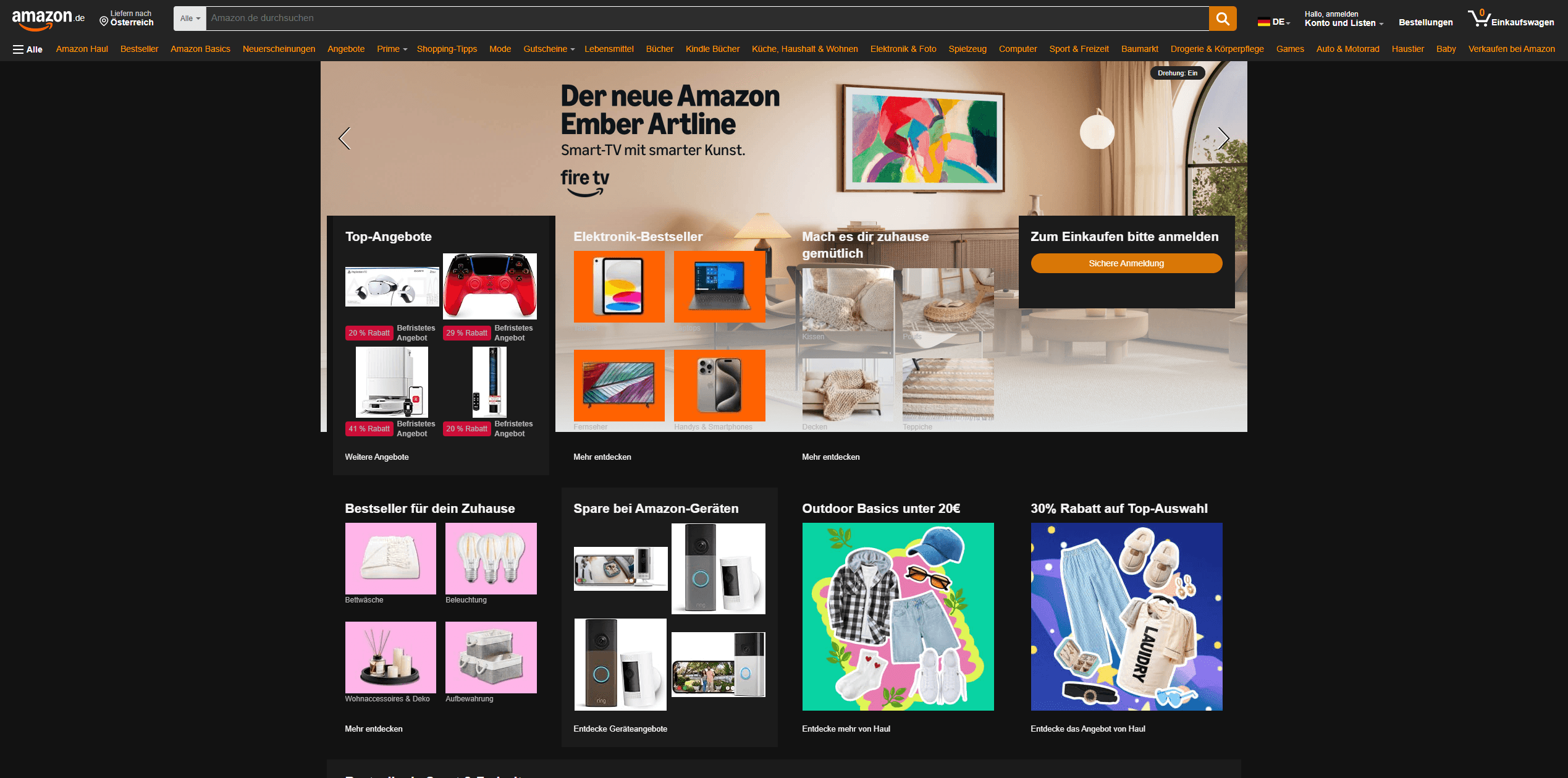
Amazon doesn't natively support dark mode — but with EuroSaver 1.4.6, that changes. EuroSaver now brings dark mode directly to Amazon, transforming the interface into a dark-themed experience that's much easier on the eyes. Whether you're browsing late at night or simply prefer a darker UI, EuroSaver handles the heavy lifting and applies a consistent dark theme across Amazon so you can shop in comfort.

Screenshot: EuroSaver dark mode active on an Amazon product page

Implementing dark mode across a website as large and complex as Amazon is an ongoing challenge, and we want to be upfront about that. There may still be areas where contrast isn't perfect, text is harder to read than it should be, or individual elements haven't fully adapted yet. We'd really love your help improving this! If you spot anything that looks off — whether it's a button, a price tag, a dropdown, or any other part of the page — please reach out and let us know. The more specific the feedback, the better we can target improvements.

We'll be continuously refining and expanding dark mode coverage in upcoming releases, so your reports make a real difference.

⬆️ Scroll-to-Top Button

Anyone who's spent time scrolling through a long Amazon product listing or search results page knows the pain of getting back to the top. With EuroSaver 1.4.6, we're introducing a Scroll-to-Top button that appears as you scroll down the page — giving you a quick and easy way to jump back to the top with a single click.

It's a small quality-of-life improvement, but one that makes the overall shopping experience noticeably smoother. No more endless scrolling back up!

💱 Currency Selection — More Than 16 Currencies Supported

Until now, EuroSaver focused on comparing prices across European Amazon stores using the Euro as the primary reference currency. With version 1.4.6, we're introducing a currency selector that lets you set your preferred currency for all price conversions.

You can now choose from more than 16 supported currencies:

  • GBP – British Pound (£)
  • GBP – British Pound (£)
  • EUR – Euro (€)
  • CHF – Swiss Franc (CHF)
  • SEK – Swedish Krona (kr)
  • PLN – Polish Zloty (zł)
  • USD – US Dollar ($)
  • CAD – Canadian Dollar (C$)
  • MXN – Mexican Peso ($)
  • BRL – Brazilian Real (R$)
  • JPY – Japanese Yen (¥)
  • INR – Indian Rupee (₹)
  • AUD – Australian Dollar (A$)
  • SGD – Singapore Dollar (S$)
  • AED – UAE Dirham (د.إ)
  • SAR – Saudi Riyal (ر.س)
  • TRY – Turkish Lira (₺)
  • EGP – Egyptian Pound (E£)

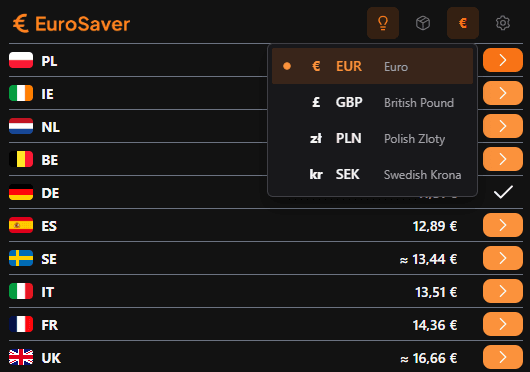
Screenshot: Currency selection dropdown in EuroSaver

Simply open the EuroSaver settings, pick your preferred currency, and all price comparisons will automatically be displayed and converted in the currency that makes the most sense for you. Whether you're based in Switzerland, the UK, or anywhere else, EuroSaver now speaks your currency.

Screenshot: Select displayed currencies in EuroSaver

Simply open up EuroSaver´s settings and select which currencies should be displayed in your dropdown menu. Don´t unnecessarily bloat your options.

🌍 Full Support for All Worldwide Amazon Stores

This is the big one. EuroSaver started out focused on European Amazon stores, but with version 1.4.6 we're going truly global. EuroSaver now supports all worldwide Amazon stores for price comparison — from amazon.com and amazon.co.uk to amazon.co.jp, amazon.com.au, amazon.in, and beyond.

This means that when you're looking at a product, EuroSaver can now pull pricing data from Amazon stores all around the world and show you where the best deal is — no matter which country it's in.

Full Control in Your Settings

You don't have to compare prices across every single Amazon store if you don't want to. In the EuroSaver settings panel, you can easily activate or deactivate individual countries and currencies to tailor the comparison to exactly the regions that are relevant to you. Want to compare only within Europe? Done. Curious about US and Japanese prices too? Just toggle them on.

This level of control ensures that your price comparisons stay clean, relevant, and fast — without unnecessary data from markets you don't shop in.

🔧 Under-the-Hood Improvements

As always, we've also shipped a number of smaller performance and stability improvements alongside the headline features. These include faster loading of price comparison data, more reliable detection of product prices across different Amazon store layouts, and general stability fixes to ensure EuroSaver continues to run smoothly across all supported browsers.

🙏 Thank You for Being Part of EuroSaver

Every feature in this release was shaped by requests, suggestions, and feedback from our community — and we genuinely couldn't do it without you. If you're enjoying EuroSaver, please consider leaving a review on the Chrome Web Store or sharing it with a friend who loves a good deal.

Got feedback on the new dark mode? Found a store that isn't behaving correctly? Something not quite right with a currency conversion? Please reach out — we read everything.

🎉 Update to 1.4.6 Now!

The update is available now. Make sure you're running EuroSaver 1.4.6 to get access to all these new features.

Happy EuroSaving! 🧡

Blog

Related posts